It's not unusual for a some environments to have complex policies that grow over a period of time, however the negative impact of these can introduce unexpected and unwanted difficulties when trying to identify what each policy does.
This drives the question, do you need an actual naming convention to help with that problem?
Let's take a step back and look at the wider picture.
Some businesses may have a team that manage conditional access policies, or perhaps they're an MSP that look after multiple customer tenants. In those situations, it's far too easy to get overwhelmed, introduce gaps and loose track of what's been implemented and where.
Yes everyone should document their implementations in an ideal world, but those of you reading this who've been in the industry a while have probably just laughed on the inside that in reality people rarely document updates made (yes I'm a cynic).
For example, if you've ever been involved with setting up a new Active Directory Domain or Azure Tenant, one of the first things you'll need to agree on is a standardised naming convention for objects, resources, accounts etc to ensure everyone works to a set design. Makes absolute sense of course!
Conditional Access Policies could absolutely benefit from the same approach.
But where you do you start?
Fortunately the community has done fantastic work in this arena already, and I take zero credit for the following recommendations. Thanks to Robbert Berghuis for sharing what we believe to be the source of the info at:
https://github.com/microsoft/ConditionalAccessforZeroTrustResources/tree/main
Naming Convention
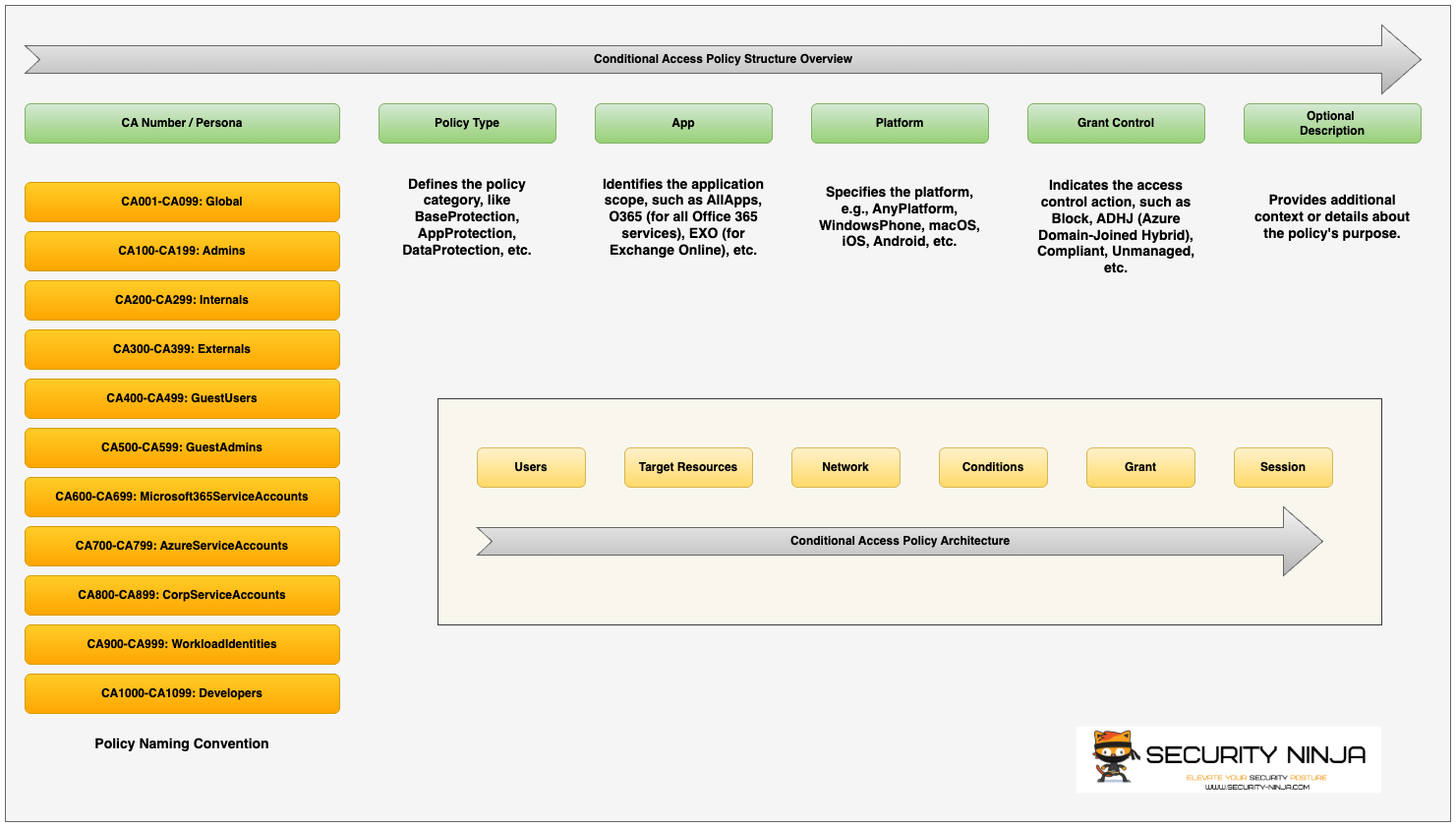
<CA Number>-<Persona>-<Policy Type>-<App>-<Platform>-<Grant Control>-<OptionalDescription>
CA Number / Persona
CA001 - CA099 Global
CA100 - CA199 Admins
CA200 - CA299 Internals
CA300 - CA399 Externals
CA400 - CA499 GuestUsers
CA500 - CA599 GuestAdmins
CA600 - CA699 M365ServiceAccounts
CA700 - CA799 AzureServiceAccounts
CA800 - CA899 CorpServiceAccounts
CA900 - CA999 WorkloadIdentities
CA1000 - CA1099 Developers
Policy Type
Defines the policy category- BaseProtection (a default policy applied to all users or apps)
- AppProtection (individual policies used to allow or deny access to specific apps)
- DataProtection (can be used as an extra layer of security such as app protection)
- IdentityProtection (Used in addition to base protection policies for capabilities such as MFA-Phishing, Risky Sign-in's etc)
- AttackSurfaceReduction (Add additional policies to protect against certain locations, device types etc)
- Compliance (requires those logging in to view acceptable use / terms of use)
App
- All Resources (formally 'All Coud Apps')
- Selected Resources
Platform
- Any Device
- Android
- IOS
- Windows Phone
- MacOS
- Linux
Grant
- Allow or Block
- Require Multifactor Authentication
- Require Authentication Strength
- Require Device to be marked Compliant
- Require Microsoft Entra hybrid Joined Device
- Require App Protection Policy
- Require all of the selected controls
- Require one of the selected controls
Optional Description
Provide additional context or details about the policy's purpose.
Examples may include:
- Sign-inFrequency
- Block
- RequirePhishingResistantMFA
- ContinuousEvalulation
- PersistantBrowser
The following diagram provides a simple overview of the fore-mentioned policy structure and is available for download on my Github.
https://github.com/SecNinjaltd/Conditional-Access-Policies
Putting it all Together
So what does this look like in reality?
Well let's look at a Global policy first.....
CA001-Global-BaseProtection-AnyApp-AnyPlatform-MFA
This policy will enforce that ANYONE, accessing ANY APP from ANY PLATFORM will require Multifactor Authentication to sign-in.
CA101-Admin-IdentityProtection-AdminPortal-Windows-RequirePhishingResistantMFA
This policy will enforce that ALL ADMINS accessing the ADMIN PORTALS from WINDOWS DEVICES will require PHISHING RESISTANT MFA to sign-in.
Hope this all makes sense and gives you some ideas around whether implementing a naming convention would be beneficial to your business or clients.
My advice would be to document your existing environment, and try to get a good understanding of who's accessing your Tenant(s), from what device(s), what services they're accessing and from where.
Start off with foundational policy concepts such as the baseline requirements then build up from there.
I'll cover policy design in another blog, but let me know if this has been helpful or not.
Good luck!!